# Morningstar MCP Server

Power your AI apps and tools with Morningstar’s trusted content. {.sub-title___devsite}

<nav class="md-docs-tabs-action___devsite">

- [Overview](#overview)
- [Access and Authentication](#access-and-authentication)
- [Tools](#tools)
- [Third-Party Integrations](#claude-integration)
- [Related Content](#related-content)

</nav>


## Overview

The Morningstar MCP Server makes it simple to power your AI apps and tools with Morningstar’s trusted content. It provides access to a growing library of AI-ready capabilities, including global analyst research, market analysis, and key investment data.

## Access and Authentication

- MCP endpoint: https://mcp.morningstar.com/mcp
- A licensed Morningstar account is required to connect and use the server.

>If you don’t have a licensed account or have questions about licensing, contact your account representative.   
>Alternatively, use the **Connect with us** form on [this page](https://www.morningstar.com/business/products/direct-ai-solutions){target="_blank"}, specifying you are interested in learning more about the Morningstar MCP Server.


## Tools

The Morningstar MCP Server currently exposes the following tools:

<table style="width:90%">
    <tr>
        <th  style="font-size: 18px !important;">Tool Name</th>
        <th  style="font-size: 18px !important;">Description</th>
    </tr>
    <tr>
        <td  style="font-size: 18px !important;">morningstar-analyst-research-tool</td>
        <td  style="font-size: 18px !important;"><p  style="font-size: 18px !important;">Returns relevant portions of Morningstar’s analyst- and quantitative-driven forward-looking investment reports.</p></td>
    </tr>
    <tr>
        <td  style="font-size: 18px !important;">morningstar-articles-tool</td>
        <td  style="font-size: 18px !important;"><p  style="font-size: 18px !important;">Returns relevant portions of articles, news, and commentary published on Morningstar.com and other Morningstar products.</p></td>
    </tr>
    <tr>
        <td  style="font-size: 18px !important;">morningstar-data-tool</td>
        <td  style="font-size: 18px !important;"><p  style="font-size: 18px !important;">Retrieves Morningstar’s AI-ready data for global mutual funds, ETFs, and stocks.</p></td>
    </tr>
    <tr>
        <td  style="font-size: 18px !important;">morningstar-fund-holdings-tool</td>
        <td  style="font-size: 18px !important;"><p  style="font-size: 18px !important;">Retrieves the top holdings for a list of mutual funds or ETFs.</p></td>
    </tr>
    <tr>
        <td  style="font-size: 18px !important;">morningstar-id-lookup-tool</td>
        <td  style="font-size: 18px !important;"><p  style="font-size: 18px !important;">Acts as the MCP server’s entity detection layer, identifying the relevant investments and data points to hand off to other tools.</p></td>
    </tr>
    <tr>
        <td  style="font-size: 18px !important;">morningstar-portfolio-analysis-tool</td>
        <td  style="font-size: 18px !important;"><p  style="font-size: 18px !important;">Analyzes a portfolio of holdings or a fund using Morningstar's X-Ray methodology, delivering breakdowns across asset allocation, sector exposure, geographic region, investment style, and risk/return metrics.</td>
    </tr>
    <tr>
        <td  style="font-size: 18px !important;">morningstar-screener-tool</td>
        <td  style="font-size: 18px !important;"><p  style="font-size: 18px !important;">Retrieves a list of investments that match given criteria.</td>
    </tr>
    <tr>
        <td  style="font-size: 18px !important;">morningstar-security-ownership-tool</td>
        <td  style="font-size: 18px !important;"><p  style="font-size: 18px !important;">Retrieves a list of funds that own a given security.</td>
    </tr>
</table>


## Third-Party Integrations

The Morningstar MCP Server is currently integrated in **Claude**, **ChatGPT**, **Copilot Studio**, and **Microsoft Foundry**. Additional integrations are coming.

### Claude

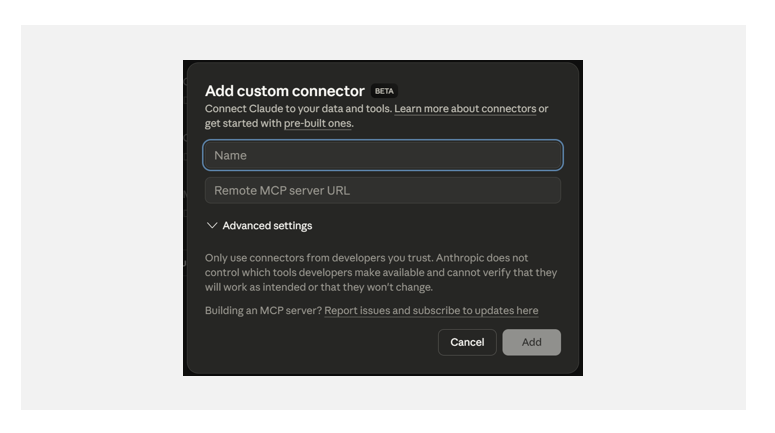
The administrator of a Claude for Enterprise account can add Morningstar as a custom connector, making it available for users of the account.

**Administrator: Add Morningstar to Enterprise Account**

Navigate to *Add custom connectors*. Search for Morningstar. In the **Remote MCP server URL** add "https://mcp.morningstar.com/mcp". 

<img src="/content/hidden-from-navigation/add-morningstar-mcp-claude-custom-connector.png"  width="600">  

&nbsp;

**User: Add Morningstar to Account**

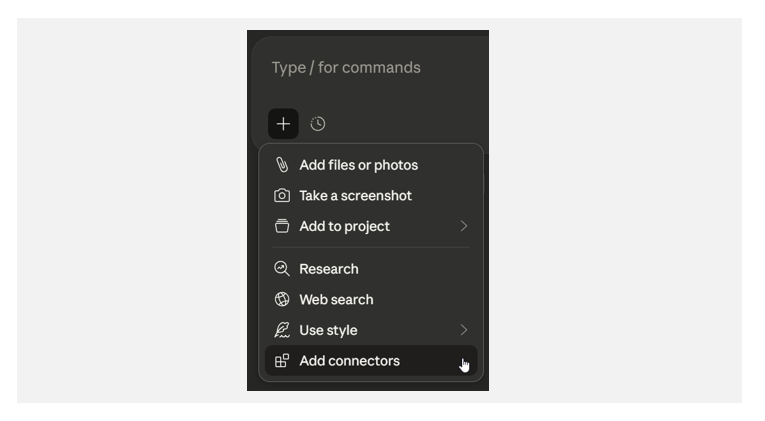
Navigate to *Add files, connectors, and more* → *Add connectors*. Search for Morningstar and connect. Authenticate using your Morningstar credentials.

<img src="/content/hidden-from-navigation/add-morningstar-mcp-claude-custom-connector-user.png"  width="600">

Alternatively, go to *Settings* → *Connectors*, select Morningstar, and authenticate there.

### ChatGPT

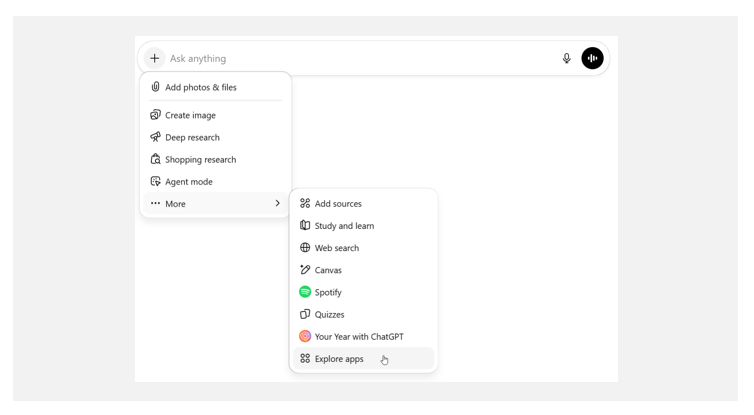
In ChatGPT, navigate to *Add files and more* → *More* → *Explore apps*. Search for Morningstar and connect.

<img src="/content/hidden-from-navigation/add-morningstar-mcp-chatgpt.png"  width="600">  

### Copilot Studio

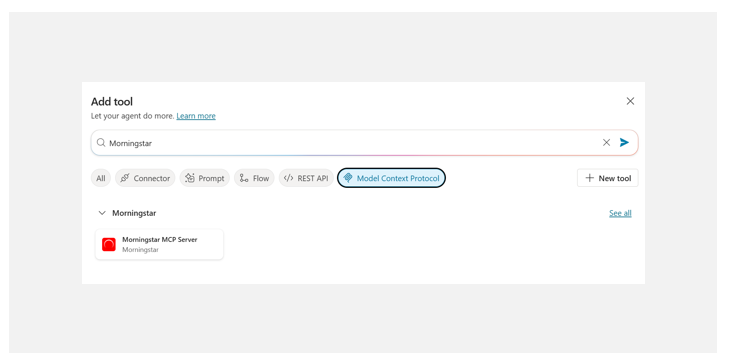
In Copilot Studio, navigate to an agent you have created (or create a new agent) then navigate to *Tools* → *Add a tool*. Search for Morningstar and connect.

<img src="/content/hidden-from-navigation/add-morningstar-mcp-copilot-studio.png"  width="600">  

We support OAuth authentication in Copilot Studio.

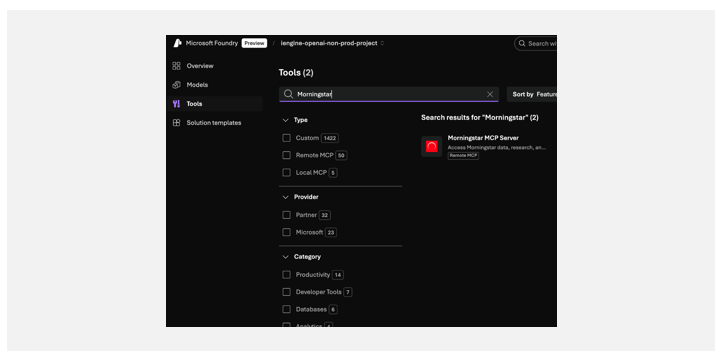
### Microsoft Foundry

In Microsoft Foundry, navigate to *Tools*. Search for Morningstar and connect.

<img src="/content/hidden-from-navigation/add-morningstar-mcp-msfoundry.png"  width="600">  

Then, select **Use in Agent** and choose your agent.

We support both token‑based authentication and OAuth authentication in Foundry.

### Microsoft Copilot App

In Copilot, navigate to Apps. Search for Morningstar and connect.

### Perplexity

[Steps to connect](https://www.perplexity.ai/help-center/en/articles/14818152-connecting-perplexity-with-morningstar)

## Related Content

- [Tools and Example Questions](/direct-web-services/documentation/morningstar-ai-integrations/morningstar-mcp-server/tools-and-example-questions)
- [Workflow Examples](/direct-web-services/documentation/morningstar-ai-integrations/morningstar-mcp-server/workflow-examples)